# EKS with ArgoCD using Terraform
Recently I wanted to try out a few things with `EKS` and `ArgoCD`. I ended up writing a bit of Terraform to make it easier for me to create and destroy the infrastructure in my test AWS account.
The code in [k8-eks-argocd-terraform](https://github.com/jayanath/k8-eks-argocd-terraform) deploys all these👇 things.
* VPC and the baseline networking
* EKS cluster
* AWS Load Balancer Controller
* ArgoCD with Ingress
* ArgoCD UI over 🔐 https with ACM cert
* [**ArogoCD ApplicationSet**](https://argo-cd.readthedocs.io/en/stable/user-guide/application-set/) (this is cool!)
* Sample applications under ApplicationSet
I used `Kubernetes Manifest files` to deploy ArgoCD. This is because the existing [`Helm Chart` for ArgoCD](https://github.com/argoproj/argo-helm/tree/main/charts/argo-cd) doesn't support the new-ish **ApplicationSet** feature at the moment. I wanted to try this feature instead of using the good old `app of apps` workaround. I used the `git-dir-generator` and pointed it to the same repository to keep everything in one place.
Rather than deploying from the laptop, I wanted to use `Github Actions` to deploy the infra 🤖. Though this made things a bit complicated, it was fun to experiment with Github Actions, and *reusable* workflows. I separated the code into `vpc`, `eks` and `argocd` for me to create/destroy parts of the infrastructure when needed.
## ♻️ Is This Code Reusable?
Of course 😊. I tried to keep things as generic as possible but you still need to update a few things to get this working with your AWS account.
☠️ **WARNING!!** ☠️
**This is going to cost you a little. Please make sure to tear down everything once you are done with your testing.**
Start with forking the repo [jayanath/k8-eks-argocd-terraform](https://github.com/jayanath/k8-eks-argocd-terraform). If you don't care about deploying the infra using Github Actions, just clone this repo instead.
### 1️⃣ Click-Ops bits
As with any 🐔 and 🥚 problem, there are few `Click-Ops` bootstrapping bits. This is needed even if you want to deploy from your laptop.
* Create an `S3 bucket` for you to store terraform remote state. (yeah, the local state works too, but..)
* Create a `Hosted zone` in `R53` with a public domain
* Create an `ACM cert` issued for `yourdomain.com` and `*.yourdomain.com`
I just created the hosted zone and ACM using click-ops 🤷♂️. Those cert validations take time and I don't have my domain registered with R53. It's with Google for safekeeping 🤫.
### 2️⃣ Github Actions bits
Skip these steps if you are deploying from your laptop.
Create an `IAM role` with enough permissions for Github Actions

Create a Github secret `AWS_CI_ROLE` with the IAM role ARN

Configure `Open ID Connect (OIDC)` for Github Actions in AWS. Just follow the docs in the reference section.

### 3️⃣ Find/Replace bits
This is to update the bucket name, domain name etc in a few places in the code before deployment.
* `k8-eks-argo-terraform-state-jay` with your S3 🪣 name
* `argo.jayforweb.com` with `argo.yourdomain.com`
* `eksadmin` with your AWS IAM user if you want to use `kubectl` from your laptop
* `us-west-2` with your region. ⚠️ Make sure to update `aws_image_repository` URL if you change the region.
### 4️⃣ Time to Deploy
I'm sure you already know this but we need to follow the order of `vpc` --> `eks` --> `argocd` when deploying all this. If you are doing it from your laptop, just follow the drill of `terraform init`, `terraform plan` and `terraform apply` from within `vpc`, `eks` and `argocd` folders. If you set up the Github Actions, all you have to do is to select the action and run it.

EKS takes about 15-20 minutes to deploy. Maybe there is a chance to fix a ☕ until the machines in the cloud do their thing 😜.
This is how long it took me to deploy everything.

### 5️⃣ Post Deployment Stuff
1. Add an alias record with the Ingress Load Balancer URL. \`AWS LoadBalancer Controller\` dynamically deploy a new LB or add new ingress into the same LB based on the setup. I couldn't figure out a way to automagically add this record to the hosted zone as I had no way of knowing when would the LB gets created.
2. Add alias records for sample apps, nginx1, nginx2 and nginx3 and target the same ALB.

3. Add your IAM user (\`eksadmin\` in my case) to the AWS configuration. Then update the \`kubeconfig\` to get access to your brand new EKS cluster and grab the ArgoCD default password from the \`argocd-initial-admin-secret\`.
1. \`export AWS\_DEFAULT\_PROFILE=eksadmin\`
2. \`aws sts get-caller-identity\`
3. \`aws eks update-kubeconfig --name eks-demo --region us-west-2 --profile eksadmin\`
4. \`kubectl get secrets -n argocd\` !\[image.png\](https://cdn.hashnode.com/res/hashnode/image/upload/v1667571895727/bxQU2HTnW.png align="left")
5. \`kubectl get secret argocd-initial-admin-secret -n argocd --template={{.data.password}} | base64 -d\`
### 6️⃣ The End Result 🎉


Now you could experiment by adding/removing/updating the sample applications. Once you commit the code, ArgoCD will faithfully adjust the apps in the cluster.
### 🔥 Tear Down ☠️
**This is super important! If you leave this setup running for long time, it's going to cost you an 🦾 and a 🦿before you know it. Make sure to use** `terraform destroy` or those Github Workflows to nuke everything.
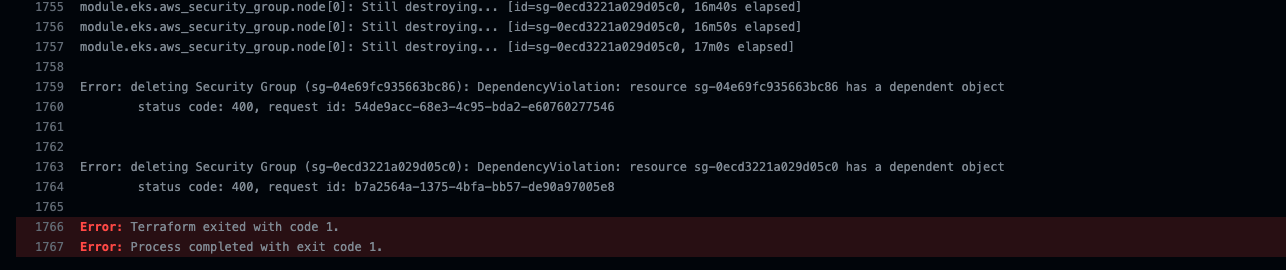
Sometimes, AWS fails to destroy certain resources.
The underlying issue is with the ENIs. This is a very old issue with AWS. Just go ahead and delete the ENI and security groups manually.



That's about it! If you reach this far, thank you 🙇♂️ for your time.
As always, just let me know if you got stuck, or if you have any questions. I'm more than happy to help! 😄👍.
### 📚 Reference
1. \[OIDC setup instructions for AWS\](https://docs.aws.amazon.com/IAM/latest/UserGuide/id\_roles\_providers\_create\_oidc.html#manage-oidc-provider-console)
2. \[OIDC setup instructions for Github\](https://docs.github.com/en/actions/deployment/security-hardening-your-deployments/configuring-openid-connect-in-amazon-web-services)
3. \[ArgoCD ApplicationSet\](https://argo-cd.readthedocs.io/en/stable/user-guide/application-set/)
4. \[jayanath/k8-eks-argocd-terraform\](https://github.com/jayanath/k8-eks-argocd-terraform)